Schlagwort-Archive: IoT

Meshtastic Knoten auf Reise

Schon geraume Zeit experimentiere ich mit unterschiedlichen Meshtastic Knoten. Bei meiner Ferienreise nach Norddeutschland wollte ich zwei dieser Knoten testen.

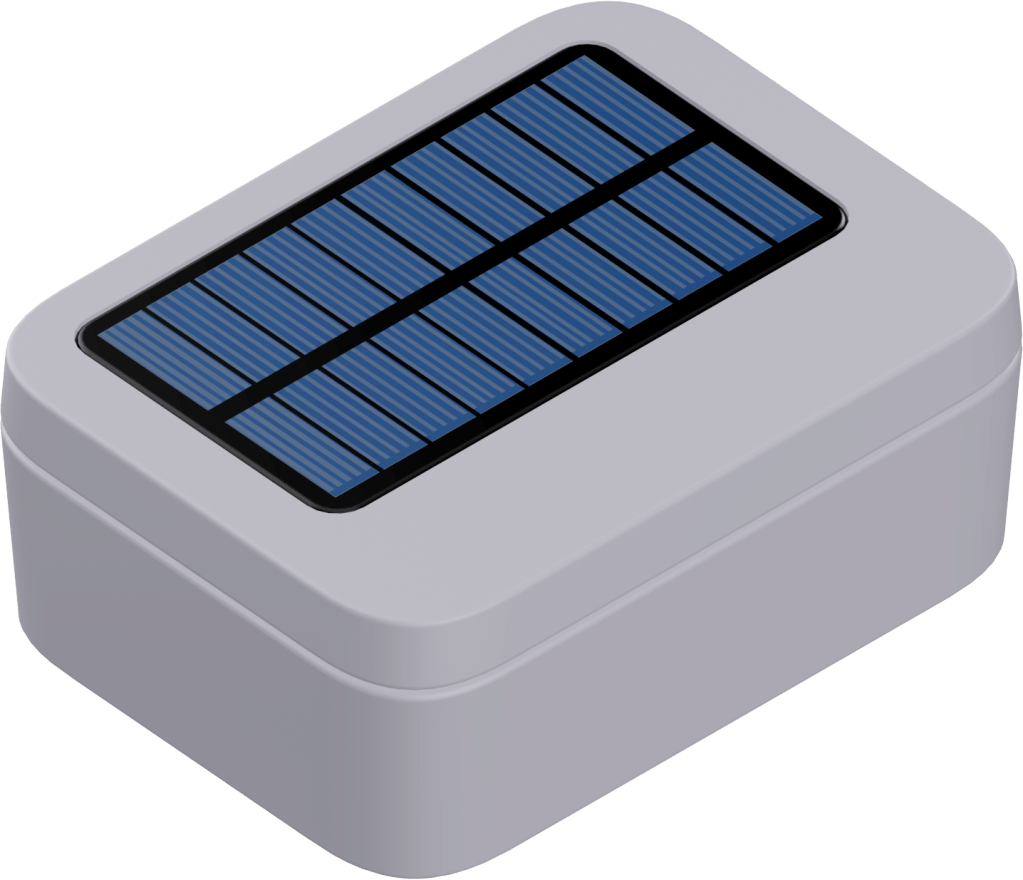
Kurz vor meinen Ferien bekam ich von RAKwireless ein WisBlock Meshtastic Starter Kit und ein Gehäuse mit Solarzelle (Unify Enclosure IP67 150x100x45mm with pre-mounted M8 5 Pin and RP-SMA antenna IP Rated connectors), welches ich für den autonomen Einsatz testen wollte.

Der Test sollte zeigen, ob die Solarzelle ausreichend Energie zum Nachladen des eingesetzten 18650-LiPo-Akkus aufbringen kann.

Bei den aktuellen Wetterbedingungen ist das sicher kein optimaler Ausgangspunkt, denn die Wahrheit zeigt sich erst bei weniger sonnigen Tagen. Irgendwann muss aber der Test beginnen.
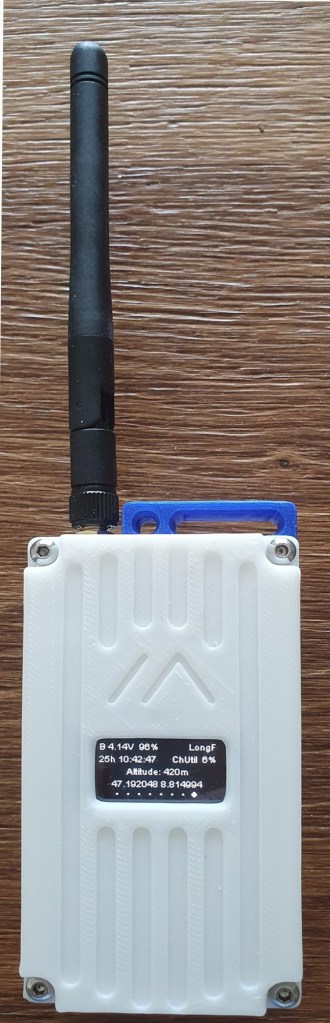
Außerdem habe ich ein WisMesh Pocket, welches bedingt durch den 3200 mAh Akku, gelegentlich über USB nachgeladen werden muss.

Ich verwende diesen Knoten gern im Auto. Da ist das Nachladen über USB kein Problem und der Knoten steht am Ende der Fahrt mit geladenem Akku zur Verfügung.

Die Batteriespannung kann dann sicherheitshalber am Display oder einem über BLE angeschlossenen Mobiltelefon verfolgt werden.

Die folgenden Abbildungen zeigen meine Reiseroute und anhand eines Auszugs aus MeshMap.net die zu erwartenden Kontakte mit Knoten auf dieser Route. Da in diesem Mapping nicht alle über Funk erreichbare Knoten gezeigt werden, bestand Hoffnung auf Kontakte, wenn auch gedämpft.

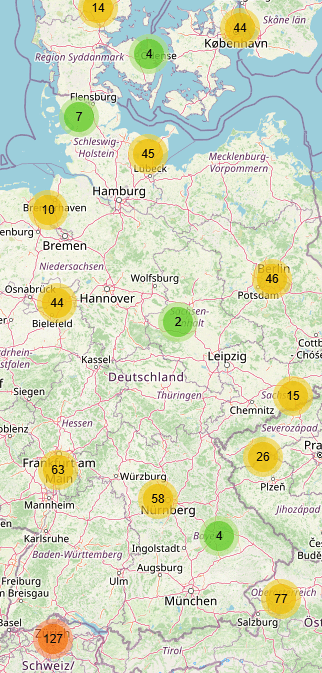
Ich habe mit den Default-Einstellungen für LongFast gearbeitet, da ich nicht die lokalen Channel der durchfahrenen Gebiete vorgeben wollte. Möglicherweise wären dann weitere Knoten erreichbar.

Die folgenden Abbildungen zeigen Kontakte, die ich an verschiedenen Orten hatte. Zwischendurch gab es keinen Empfang.

Während der Fahrt lagen beide Meshtastic Knoten auf der vorderen Ablage (praktisch nahe der Windschutzscheibe) und während der Ferien hatte der Solarknoten einen bevorzugten Standort am Strand. Während unserer Strandaufenthalte war das Reload durch die Solarzelle überhaupt kein Problem. Ich werde das aber weiter verfolgen.

Angekommen an der Ostsee konnte ich vom Strand der Insel Hiddensee Meshtastic Knoten in DK und S sehen. Diese ca. 130 km sind sicher Überreichweiten zu verdanken, denn ich hatte solche Kontakte nur an zwei Tagen innerhalb von drei Wochen. Aus Mecklenburg-Vorpommern habe ich nichts empfangen.

Bei der Rückreise hatten wir einen Zwischenstopp in Jena und konnten einige Meshtastic Knoten empfangen.

Wie schon bei der Hinfahrt waren im unteren Rheintal einige Knoten zu sehen und später beim Eintritt ins Gebiet Zürichsee/Linth war dann wieder das gewohnte Bild mit einer dichten Belegung zu sehen.

Die Maps zeigen deutlich, dass ein Community-Projekt von der Community lebt.

Verstehen Sie das als Einladung, selbst Meshtastic Knoten zu installieren und auf diese Weise die Lücken im Mesh-Netzwerk zu schließen.


2024-08-12/CK
Modbus Sensors Connected to IoT

Modbus continues to be a widely used communication protocol in industrial automation and control systems. RS-485 provides a robust and reliable physical layer for long-distance communication, and Modbus RTU is a popular protocol for exchanging data between devices from different manufacturers in various industrial applications.

Despite the emergence of newer protocols and technologies, Modbus RTU over RS-485 will continue to be widely used in the industry due to its simplicity, compatibility with existing systems, and broad support.

Various bridges connect a Modbus network to the IoT for further data processing and visualization, which is essential today. Modbus LoRaWAN bridges, offered by various users, can be used to make this connection.

Modbus ist nach wie vor ein weit verbreitetes Kommunikationsprotokoll in industriellen Automatisierungs- und Steuerungssystemen. RS-485 bietet eine robuste und zuverlässige physikalische Schicht für die Kommunikation über große Entfernungen, und Modbus RTU ist ein beliebtes Protokoll für den Austausch von Daten zwischen Geräten verschiedener Hersteller in verschiedenen industriellen Anwendungen.

Trotz des Aufkommens neuerer Protokolle und Technologien wird Modbus RTU über RS-485 aufgrund seiner Einfachheit, der Kompatibilität mit bestehenden Systemen und der breiten Unterstützung weiterhin in der Industrie weit verbreitet sein.

Verschiedene Bridges verbinden ein Modbus-Netzwerk mit dem IoT zur weiteren Datenverarbeitung und -visualisierung, was heute unerlässlich ist. Modbus LoRaWAN-Bridges, die von verschiedenen Anwendern angeboten werden, können für diese Verbindung genutzt werden.

In my book IoT Projects for Makers, I introduced among others a solution for publishing measuring values of a Modbus sensor by Pushover to a mobile phone by use of WisBlock modules.

In meinem Buch IoT Projects for Makers habe ich unter anderem eine Lösung vorgestellt, um Messwerte eines Modbus-Sensors per Pushover mit Hilfe von WisBlock-Modulen auf ein Mobiltelefon zu veröffentlichen.

The same technology can be used to transfer messages to a LoRaWAN network server. The WisBlock ecosystem helps with rapid prototyping.

Mit der gleichen Technologie können Sie Nachrichten an einen LoRaWAN-Netzwerkserver übertragen. Das WisBlock-Ökosystem hilft bei der schnellen Entwicklung von Prototypen

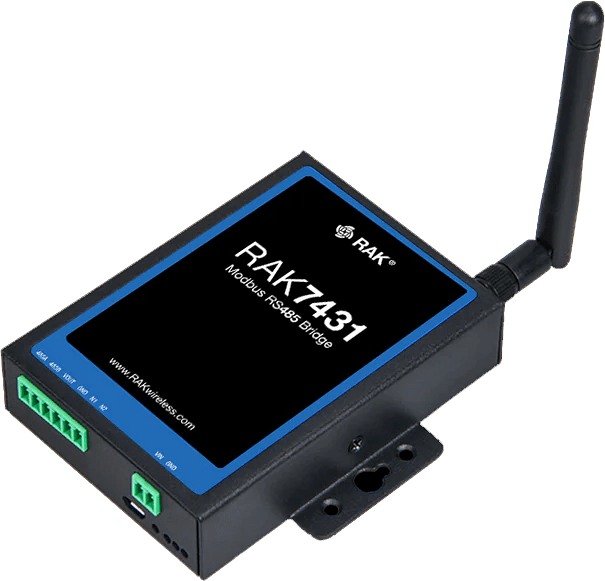
RAK7431

RAKwireless offers an industrial solution with the WisNode Bridges and in particular the RAK7431 WisNode Bridge Serial, an RS485 to LoRaWAN converter for industrial applications. The device transmits data from Modbus sensors over LoRaWAN for wireless transmission to and from end devices.

Using the LoRaWAN 1.0.3 protocol stack, the device supports LoRaWAN Class A, B and C, enabling cloud management of ModBus/RS-485 devices.

Eine industrielle Lösung bietet RAKwireless mit den WisNode Bridges und hier vor allem mit der RAK7431 WisNode Bridge Serial, einem RS485 to LoRaWAN converter für industrielle Anwendungen. Das Gerät übermittelt Daten von Modbus-Sensoren über LoRaWAN zur drahtlosen Übertragung von und zu Endgeräten.

Mit dem LoRaWAN 1.0.3 Protokollstack unterstützt das Gerät LoRaWAN Class A, B und C und ermöglicht so ein Cloud-Management von ModBus/RS-485-Geräten.


2024-05-19/CK

RAKwireless Meshtastic Starterkit Enclosure

In the blog posts Meshtastic – Off-Grid Open-Source Mesh Network and Visualization of Meshtastic Data with Datacake, I presented a Meshtastic network and the visualization of measurement data.

The Meshtastic node is not only characterized by sensor technology and networking. Its enclosure is equally decisive for its intended use. Boards alone can be used for evaluation, but not in real use.

While visiting the RAKwireless booth at Embedded World 2024, I saw the enclosure for the RAKwireless starter kit shown here and have now tried it out.

You can download the data for the housing from the Printables website or order it from the QuantumShadow3D store.

As the following pictures show, this is a very successful enclosure design for this purpose.

In den Blog Posts Meshtastic – Off-Grid Open-Source Mesh Network und Visualization of Meshtastic Data with Datacake hatte ich ein Meshtastic Netzwerk und die Visualisierung von Messdaten vorgestellt.

Der Meshtastic Knoten selbst zeichnet sich nicht nur durch die Sensorik und die Vernetzung aus. Sein Gehäuse ist gleichermaßen bestimmend für den Einsatzzweck. Für die Evaluierung kann mit Boards gearbeitet werden, im realen Einsatz nicht.

Bei meinem Besuch am Stand von RAKwireless zur Embedded World 2024 konnte ich das hier gezeigte Gehäuse für das RAKwireless Starterkit sehen und habe es nun auch ausprobieren können.

Sie können die Daten für das Gehäuse von der Printables Website herunterladen oder im Shop von QuantumShadow3D bestellen.

Wie die folgenden Bilder zeigen, ist das eine sehr gelungene Gehäusekonstruktion für diesen Zweck.


2024-04-14/CK

QingPing Temperature & Humidity Monitor

Environmental sensors monitor the temperature and humidity levels in different rooms of a building and enable the system to intelligently adjust the HVAC settings. A dynamic control ensures a comfortable and healthy indoor environment

RAKwireless offers the QingPing Temperature & Humidity Pro S a professional-grade sensor specifically tailored for environmental and greenhouse applications.

The device supports configurable reporting and notification options, keeping users informed about critical changes in temperature and humidity levels.

Umgebungssensoren überwachen Temperatur- und Luftfeuchtigkeit in den verschiedenen Räumen eines Gebäudes und ermöglichen eine intelligente Anpassung der HLK-Einstellungen. Eine dynamische Steuerung sorgt für ein angenehmes und gesundes Raumklima.

RAKwireless bietet mit dem QingPing Temperature & Humidity Pro S einen professionellen Sensor, der speziell für Umwelt- und Gewächshausanwendungen entwickelt wurde.

Das Gerät unterstützt konfigurierbare Berichts- und Benachrichtigungs-optionen, die den Benutzer über kritische Änderungen der Temperatur- und Luftfeuchtigkeitswerte informieren.

Features

  • Temperature: ±0.2°C (within 0°C to 50°C range)
  • Humidity: ±2% (within the 10% to 90% range)
  • LoRaWAN bands: EU868 (default), EU433, RU864, CN470, KR920, IN865, AU915, US915, AS923
  • LoRaWAN Class: A
  • Bluetooth 5.0
  • Battery: Rechargeable lithium battery, 2600 mAh
  • Power supply: USB-C, 5 V – 1 A
  • Remotely configurable settings
  • Dimension: 77 x 77 x 28 mm

For Device Configuration and Data Description read the User Manual.

The sensor sends different messages like historical data, real-time data, events, etc.

At this time, QingPing does not offer a payload decoder; therefore, I wrote a simple one for decoding the real-time data message.

Zur Gerätekonfiguration und Datenbeschreibung lesen Sie bitte das Benutzerhandbuch.

Der Sensor sendet verschiedene Nachrichten wie historische Daten, Echtzeitdaten, Ereignisse usw.

Da QingPing derzeit keinen Payload-Decoder anbietet, habe ich einen einfachen Decoder für die Dekodierung der Echtzeitdaten geschrieben.

function decodeUplink(input) {
  var data = {};
  if (input.bytes[1] == 0x41 && input.bytes[3] == 0x01) {
    data.msg = "RTD";
    data.temp = ((((input.bytes[8] << 8) + input.bytes[9]) >> 4) - 500)/10;
    data.humi = ((((input.bytes[9] << 8) + input.bytes[10]) & 0x0FFF))/10;
    data.bat = input.bytes[13];
  } 
  
  return {
    data: data
  };
}

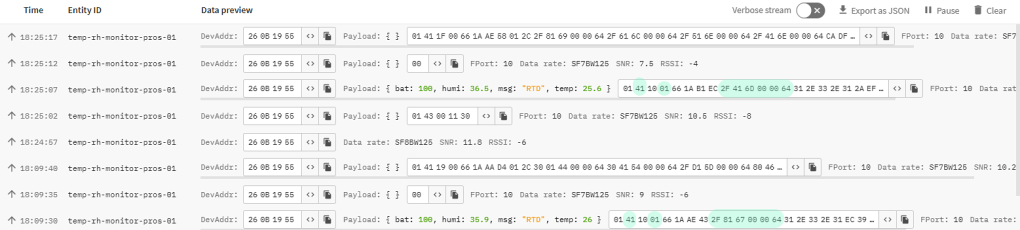
Using this payload decoder, the TTS console shows the following messages. As you can see, only the real-time data messages beginning with 01 41 xx 01 are decoded.

Bei Verwendung dieses Payload-Decoders zeigt die TTS-Konsole die folgenden Meldungen an. Wie Sie sehen können, werden nur die Echtzeitdatenmeldungen, die mit 01 41 xx 01 beginnen, dekodiert.


Thanks to RAKwireless for this LoRaWAN gift at Embedded World 2024 and the good conversations at the booth. It reminds me of my visit there.


2024-04-13/CK

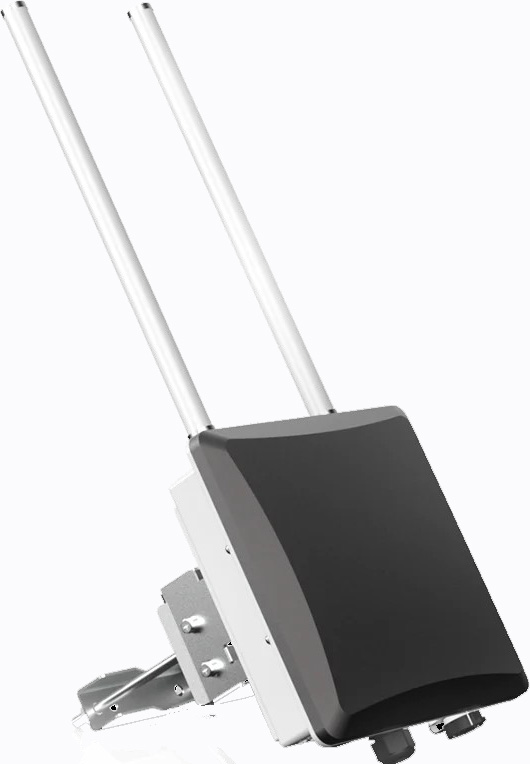
WisGate Edge Pro – RAKwireless‘ WisGate Edge Gateway

RAK7289 V2 WisGate Edge Pro is the latest edition of the RAK Edge Series.

Its excellent features is described at https://docs.rakwireless.com/Product-Categories/WisGate/RAK7289-V2/Datasheet/. You can see it on Embedded World 2024.

It is a good idea to see the new IoT solutions tomorrow at Embedded World in Hall 3 Booth 3-600.


2024-04-10/CK

Visualization of Meshtastic Data with Datacake

In the Meshtastic network, a router can send data via MQTT to any MQTT broker on the Internet.

This makes it possible to have data from one or more Meshtastic devices processed or visualized by an external instance.

My Meshtastic network has differently equipped Meshtastic devices. The WisBlock Meshtastic Device is equipped with a RAK1901 sensor for measuring temperature and humidity and a RAK12500 GNSS GPS Location Module u-blox ZOE-M8Q, whose measured values are to be visualized with a Datacake dashboard.

Im Meshtastic Netzwerk kann ein Router Daten über MQTT an jeden beliebigen MQTT Broker im Internet senden.

Dadurch besteht die Möglichkeit, Daten eines oder mehrerer Meshtastic Devices durch eine externe Instanz bearbeiten oder visualisieren zu lassen.

Mein Meshtastic Netzwerk weist unterschiedlich ausgestattete Meshtastic Devices auf. Das WisBlock Meshtastic Device ist mit einem RAK1901 Sensor zur Messung von Temperatur und Luftfeuchtigkeit und einem RAK12500 GNSS GPS Location Module u-blox ZOE-M8Q ausgestattet, deren Messwerte mit einem Datacake Dashboard visualisiert werden sollen.

Visualization of Meshtastic Data with Datacake

The WisBlock Meshtastic Device is installed in an outdoor enclosure with a solar cell.

The test is intended to show whether the buffering provided by the solar cell is sufficient

Das WisBlock Meshtastic Device ist in einem Outdoor Gehäuse mit Solarzelle untergebracht.

Der Test soll zeigen, ob die Pufferung durch die Solarzelle ausreichend ist

Solar Unify Outdoor Enclosure

A Heltec LoRa32 V3 device is configured as a router and the MQTT module sends messages to an MQTT router.

Of the messages sent, only the telemetry and position messages of the WisBlock Meshtastic device are here of interest. The device has the ID 2692927950.

The following JSON fragments show the payload to be decoded.

Ein Heltec LoRa32 V3 Device ist als Router konfiguriert und das MQTT Modul sendet Messages an einen MQTT Router.

Von den versendeten Messages sind hier nur die Telemetry und Position Messages des WisBlock Meshtastic Devices von Interesse. Das Device weißt die ID 2692927950 auf.

Die folgenden JSON-Fragmente zeigen die zu decodierende Payload.

{
  "channel": 0,
  "from": 2692927950,
  "id": 647220954,
  "payload": {
    "air_util_tx": 0.0718611106276512,
    "battery_level": 59,			
    "channel_utilization": 11.1266660690308,
    "voltage": 3.8199999332428			
  },
  "rssi": -123,
  "sender": "!fa66367c",
  "snr": -10,
  "timestamp": 1707662825,
  "to": 4294967295,
  "type": "telemetry"
}
{
  "channel": 0,
  "from": 2692927950,
  "id": 198387353,
  "payload": {
    "barometric_pressure": 0,
    "current": 0,
    "gas_resistance": 0,
    "relative_humidity": 77.9700012207031,
    "temperature": 6.55000019073486,
    "voltage": 0
  },
  "rssi": -108,
  "sender": "!fa66367c",
  "snr": 4,
  "timestamp": 1707671407,
  "to": 4294967295,
  "type": "telemetry"
}

{
  "channel": 0,
  "from": 2692927950,
  "id": 1607030652,
  "payload": {
    "PDOP": 769,
    "ground_speed": 24,
    "ground_track": 20434000,
    "latitude_i": 471919845,
    "longitude_i": 88149573,
    "sats_in_view": 3,
    "time": 1707662920,
    "timestamp": 1707662805
  },
  "rssi": -123,
  "sender": "!fa66367c",
  "snr": -10,
  "timestamp": 1707662922,
  "to": 2692927950,
  "type": "position"
}

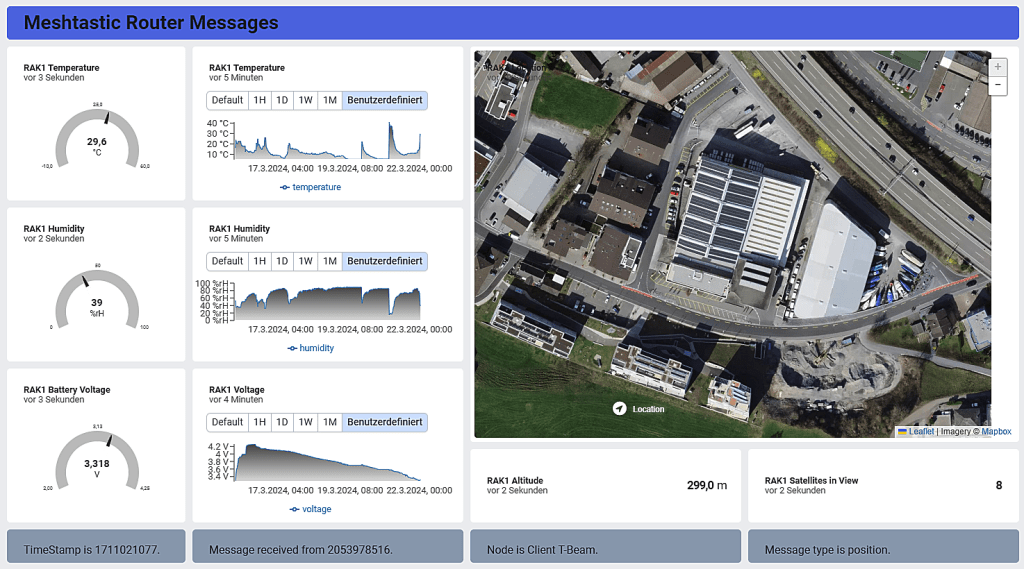
After Datacake is connected to the MQTT broker, the received payload can be decoded using JavaScript.

The Datacake dashboard can then be set up for the desktop according to the following image.

Nach Verbindung von Datacake mit dem MQTT Broker kann die Decodierung der empfangenen Payload mit Hilfe von JavaScript vorgenommen werden.

Das Datacake Dashboard kann dann gemäss folgendem Bild für den Desktop eingerichtet werden.

Datacake Dashboard

But Datacake also allows you to create dashboards for mobile devices, as the following image shows

Datacake ermöglicht aber auch das Erstellen von Dashboards für Mobilgeräte, wie das folgende Bild zeigt.

Datacake Mobil Dashboard

2024-03-21/CK

Meshtastic – Off-Grid Open-Source Mesh Network

Meshtastic® is an open-source project that uses low-cost LoRa modules to build a long-range, off-grid mesh network in areas without reliable communications infrastructure.

Meshtastic uses LoRa, a long-range radio protocol that is widely available in most regions without the need for additional licenses or certifications. The license-free ISM band is reserved for this type of communication.

The radios rebroadcast messages they receive, ensuring that every node, even those at the furthest distance, can receive messages. Depending on the settings, the Meshtastic mesh network can simultaneously support up to 100 nodes.

Meshtastic radios can be paired with a single phone to send messages directly to an addressed radio. Please note that each device can only support a connection from one user at a time.

The mesh algorithm implements the principle of „flooding.“ Each node sends each packet to its neighbor node, which forwards the packet accordingly. This hop is a chain of wireless links leading ultimately to the destination node. When the packet is forwarded, the hop limit (HL) is reduced by one. The default HL is 3, but it can be set to 7. A packet with a HL of 0 will not be forwarded.

For more information on setting up and operating a Meshtastic network, I must refer you to the extensive information on the Meshtastic website. A very good introduction in German can be found here.

Meshtastic® ist ein Open-Source-Projekt, das kostengünstige LoRa-Module verwendet, um ein netzunabhängiges Mesh-Netzwerk mit großer Reichweite in Gebieten ohne zuverlässige Kommunikationsinfrastruktur aufzubauen.

Meshtastic verwendet LoRa, ein Long-Range Funkprotokoll, das in den meisten Regionen verfügbar ist, ohne dass zusätzliche Lizenzen oder Zertifizierungen erforderlich sind. Das lizenzfreie ISM-Band ist für diese Art der Kommunikation reserviert.

Die LoRa-Module senden die empfangenen Nachrichten weiter, so dass jeder Knoten, auch der am weitesten entfernte, Nachrichten empfangen kann. Je nach Einstellung kann das Meshtastic Mesh-Netzwerk bis zu 100 Knoten gleichzeitig unterstützen.

Meshtastic-Knoten können mit einem Mobiltelefon gepaart werden, um Nachrichten direkt an einen adressierten Knoten zu senden. Jeder Knoten kann immer nur eine Verbindung von einem Benutzer gleichzeitig unterstützen.

Der Mesh-Algorithmus setzt das Prinzip des „Flooding“ um. Jeder Knoten sendet jedes Paket an seinen Nachbarknoten, der das Paket entsprechend weiterleitet. Dieser Hop ist eine Kette von Weiterleitungen, die schließlich zum Zielknoten führt. Bei der Weiterleitung des Pakets wird das Hop-Limit (HL) um eins verringert. Das Standard-HL ist 3, kann aber auch auf 7 gesetzt werden. Ein Paket mit einem HL von 0 wird nicht mehr weitergeleitet.

Für weitere Informationen zur Einrichtung und zum Betrieb eines Meshtastic-Netzwerks muss ich Sie auf die umfangreichen Informationen auf der Meshtastic-Website verweisen. Eine sehr gute Einführung in deutscher Sprache finden Sie hier.


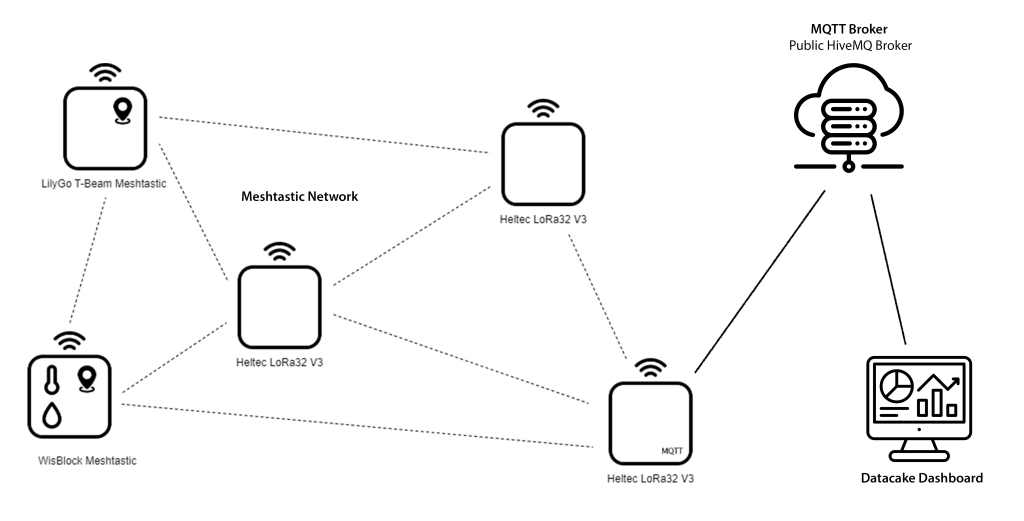
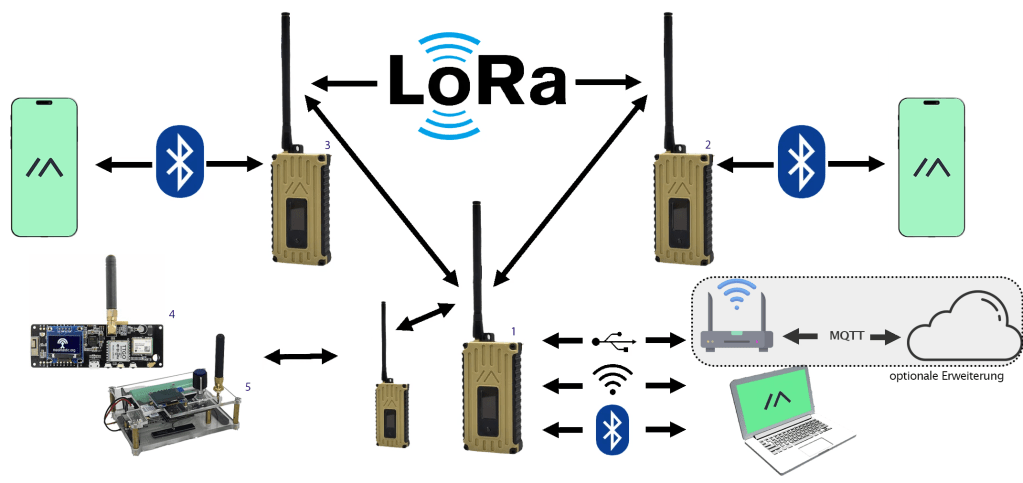
For initial tests, I set up the Meshtastic network shown in the picture.

Für erste Tests habe ich das im Bild gezeigte Meshtastic Netzwerk aufgebaut.

Meshtastic Network

I’m going to show you the first results here, to whet your appetite for a more in-depth exploration of the world of Meshtastic.

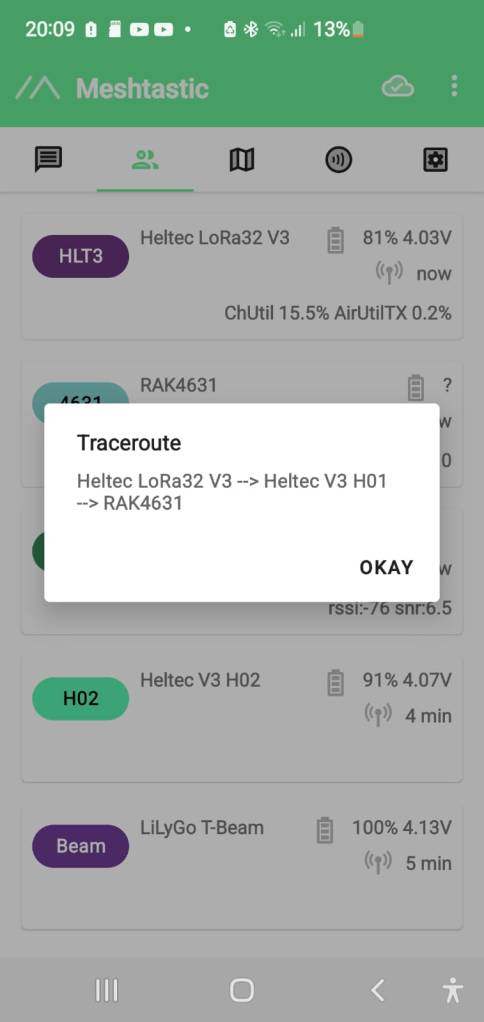
The first image shows the router created with a Heltec Lora32 V3 connected to the mobile phone via WiFi (192.168.1.114). The second shows my own nodes and the third shows external nodes visible on the public primary channel. Depending on the configuration of each node, you can see battery voltage, GPS data, environmental data, and distances. The fourth screen shows the location data on a map of the area. Beam shows the location of my LilyGo T-Beam.

The last two screens show the tracking of a moving node. First, the connection is made via the LilyGo T-Beam, and then, after the position has changed, via the Heltec V3 H01 node. This rerouting shows very well the possibilities of a mesh network.

Ich zeige Ihnen hier erste Ergebnisse, um die Lust am tieferen Erkunden der Meshtastic Welt zu wecken.

Im ersten Bild ist der mit einem Heltec Lora32 V3 gebildete Router über WiFi (192.168.1.114) mit dem Mobilphone verbunden, während im zweiten meine eigenen Knoten und im dritten Bild externe, im öffentlichen Primary Channel sichtbare Knoten zu sehen sind. Je nach Ausstattung der jeweiligen Knoten werden Batteriespannung, GPS-Daten oder Umgebungsdaten und Entfernungen angezeigt. Im vierten Bild sind die Positionsdaten in einem Map angezeigt. Mit Beam sehen Sie die Standortdaten meines LilyGo T-Beam.

Die beiden letzten Bilder zeigen das Tracing eines bewegten Knotens. Zuerst erfolgt die Verbindung über den LilyGo T-Beam und nach der Veränderung der Position über den Knoten Heltec V3 H01. Dieses Re-Routing zeigt die Möglichkeiten eines Mesh Netzwerk sehr gut.

The router supports the organization of network participants and the sending of MQTT messages via its WiFi interface. By connecting to the Internet, it can bridge the boundaries of the mesh network.

For example, an MQTT message in JSON format contains the information shown in the following image

Der Router unterstützt nicht nur die Organisation der Teilnehmer des Netzwerks, sondern ermöglicht durch sein WiFi-Interface auch das Versenden von MQTT-Messages und kann dadurch die Grenzen des Mesh-Netzwerks durch Verbindung ins Internet überbrücken.

Eine MQTT-Message im JSON-Format enthält beispielsweise die im folgenden Bild gezeigten Informationen.

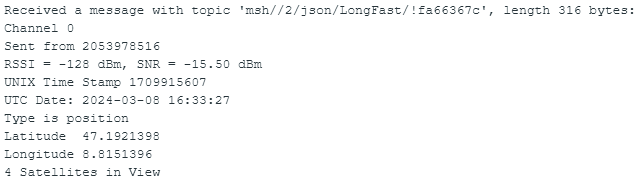
The information can be made readable by parsing the transmitted payload.

I use a separate ESP32 for this, which has subscribed to the messages with the topic msh/#, decodes their payload and displays it via the console. The display can of course also be made more convenient.

Durch Parsing der übermittelten Payload kann die Information lesbar gestaltet werden.

Ich nutze hierfür einen separaten ESP32, der die Messages mit dem Topic msh/# abonniert hat, deren Payload decodiert und über die Console zur Anzeige bringt. Die Anzeige kann natürlich auch komfortabler gestaltet werden.

Telemetry Message
Position Message

The Meshtastic logo trademark is the trademark of Meshtastic LLC.


2024-03-08/CK

SensorHub Weather Data on Meteologix

I have been using Kachelmannwetter’s information and following their weather forecast on YouTube for a long time.

Kachelmannwetter provides extensive weather and environmental data, as well as webcam recordings. Interested parties can also contribute weather data to complete the range of data on offer.

I have taken up the invitation and, as a new Citizen Scientist, I am now also making my SensorHub data available on the Meteologix platform.

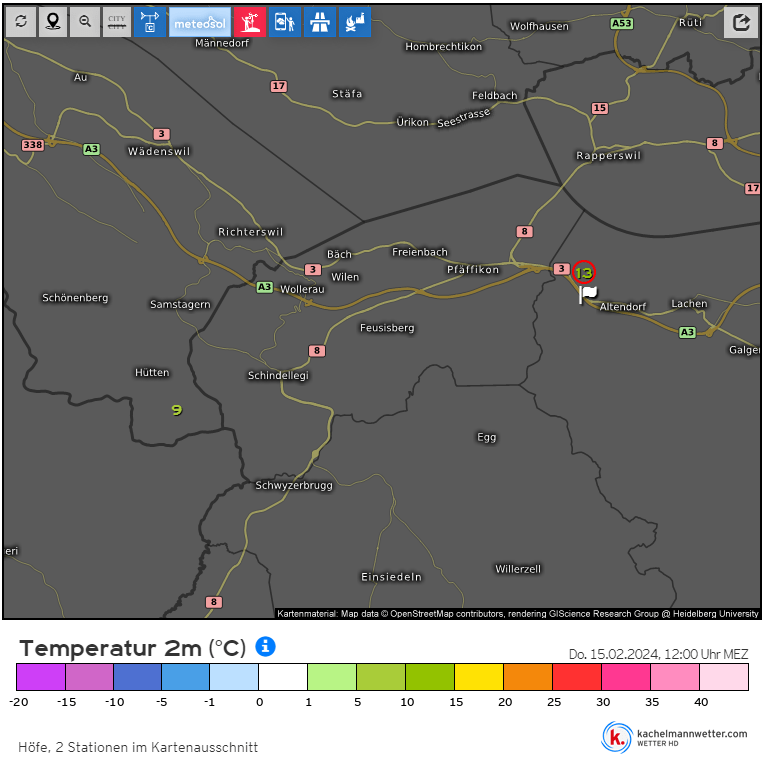
The images below display the professional and amateur weather stations in my area. Additionally, the graph depicts the ambient temperature measured at a height of 2 meters over a 72-hour period.

Schon lange nutze ich die Informationen von Kachelmannwetter und verfolge die Wettervorhersage auf Youtube.

Neben der Bereitstellung umfangreicher Wetter- und Umweltdaten sowie Webcam-Aufnahmen können Interessenten Wetterdaten beisteuern und so das Angebot an Daten komplettieren.

Ich habe die Aufforderung aufgegriffen und stelle als neuer Citizen Scientist nun meine SensorHub Daten auch auf der Meteologix Plattform bereit.

In den folgenden Bildern sind die Profi- und Amateur-Wetterstationen meiner Gegend gezeigt. Abschließend ist der 72 h Verlauf der Umgebungstemperatur gemessen in 2 m Höhe gezeigt.

Profi Weather Stations
Amateur Weather Stations
SensorHub 72 h Weather Data

The program Oxocard_MQTT_Client_Weather_Portals uses an Oxocard Connect to retrieve the data from the TTN LNS and prepare it for upload.

The program covers both Meteologix and Weathercloud.

Das Programm Oxocard_MQTT_Client_Weather_Portals nutzt einen Oxocard Connect, um Daten vom TTN LNS abzurufen und für den Upload vorzubereiten.

Das Programm deckt sowohl Meteologix als auch Weathercloud ab.


Die Screenshots wurden mit freundlicher Genehmigung von der Website kachelmannwetter.com übernommen.


2024-02-15/CK

SensorHub – Reduction of Power Consumption

The power supply of the SensorHub by an RAK9154 solar battery enables the autonomous operation of the complete measuring station. I describe this in my eBook SensorHub IoT Applications.

I had to close the chapter describing this application as follows: On sunny days, recharging the battery will hardly be a problem. On cloudy days, this balance looks less favorable, and it remains to be seen whether the weather conditions in my area offer sufficiently good conditions. It is, therefore, essential that the anticipated variant of the SensorHub promises to reduce power requirements further.

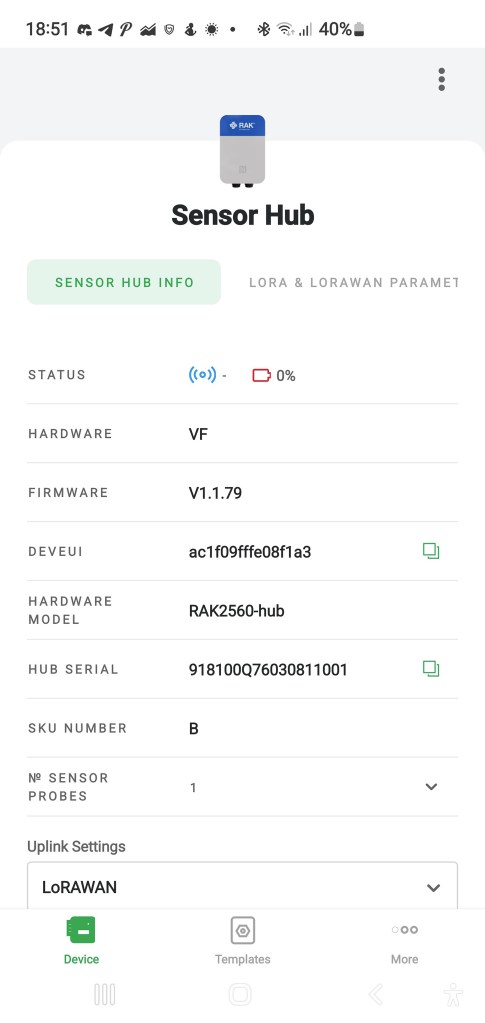
I have good news today. I got a new version of SensorHub and replaced the existing one. As you can see in the screenshot of the WisToolBox app, the hardware version changed from VF zu VH and the firmware from V1.1.79 to V1.2.6.

Existing Version of SensorHub
New Version of SensorHub

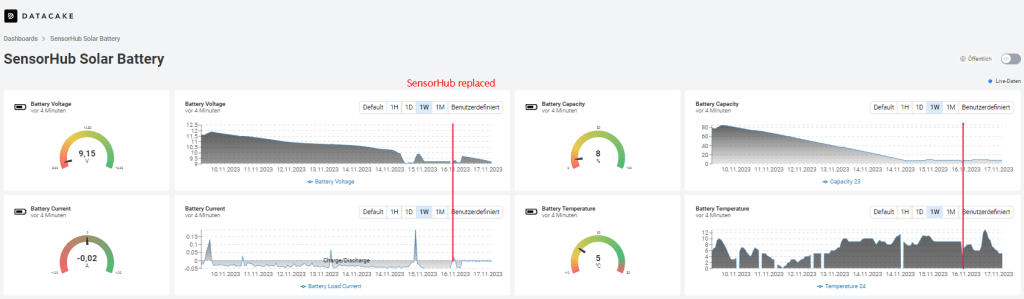
The following screenshot shows the behavior of the solar battery before and after the SensorHub replacement. The weather conditions are worse over the whole period.

You can see that before the replacement of the SensorHub the current consumption was about 50 mA in the phase of discharge. After the replacement, it is reduced significantly. The same behavior can be seen in the battery capacity curve. Before the replacement, the battery capacity dropped between 10% and 20% per day without recharging.

After the replacement, the discharge remains quite small. The current consumption was about 10 mA in the phase of discharge, and the battery capacity dropped by about 1%. The weather conditions were very bad therefore, the recharging was limited to a short time.

Now, I’m waiting for a sunny day so that the solar cell can charge the battery sufficiently to survive a period of bad weather without losing the connection.

The sun came out for a few hours, and the battery was charged. During this time, the solar cell delivers a considerable charging current.

We are on the right way, as you can see, after two days with a bit of sun.


2023-11-23/CK

SensorHub IoT Applications

RAKwireless‘ SensorHub is a modular ecosystem consisting of the main body and multiple pre-configured sensor probes. With pluggable, interchangeable probes and the option to add third-party sensors to the system, the Sensor Hub is a suitable and versatile solution platform for various IoT applications where environmental monitoring is needed outdoors.

The SensorHub can work battery-powered by non-rechargeable or solar-powered batteries or with an external power supply, depending on the application and deployment location.

For data transmission into Low-Power Wide-Area Network (LPWAN), LoRaWAN is available. Alternatively, NB-IoT can be used.

As a typical low-code system, it requires configuration with the WisToolBox app from a cell phone. WisToolBox also enables access to the measured values of all connected sensors, as the following screenshots show.

The eBook SensorHub IoT Applications will be available from Amazon from November 15, 2023. Pre-orders are already possible.

This eBook introduces the SensorHub system and its usage in industrial-grade IoT applications using LoRaWAN for communication.

The first image shows a SensorHub with a connected SensorProbe equipped with WisBlock sensors. This application is suitable for powering by batteries, too.

The second image shows a SensorHub Measuring Station built by RK900-09 Weather Station, RK520-02 Soil Moisture Sensor, and RAK9154 Solar Battery. These components build an autonomous working measuring station. The measuring station was installed to test the acquisition of the measuring values via the connected sensors on the one hand and its behavior regarding solar-buffered battery operation in the darker season on the other hand.

You can access the live data at https://app.datacake.de/dashboard/d/8f0da5ea-e1f5-4da8-b951-7c19c98e0de2 and the loading situation of the solar-buffered battery at https://app.datacake.de/dashboard/d/19f2e113-74b9-4950-81be-28f9df871ae0.

This new eBook shows how to create professional IoT applications with the RAKwireless SensorHub system.

I will publish additions and further applications here in this blog.

Your queries are welcome.


2023-11-08/CK