Schlagwort-Archive: Hardware

Meshtastic – Off-Grid Open-Source Mesh Network

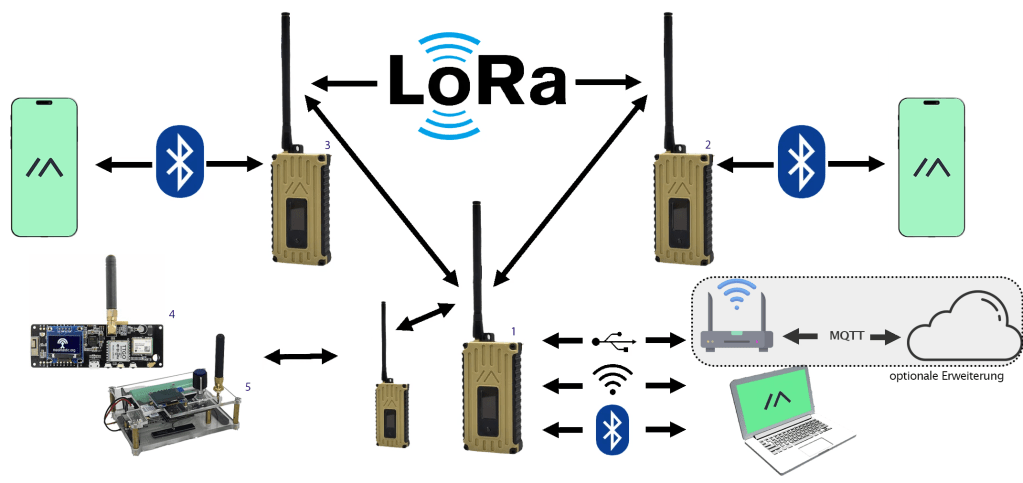
Meshtastic® is an open-source project that uses low-cost LoRa modules to build a long-range, off-grid mesh network in areas without reliable communications infrastructure.

Meshtastic uses LoRa, a long-range radio protocol that is widely available in most regions without the need for additional licenses or certifications. The license-free ISM band is reserved for this type of communication.

The radios rebroadcast messages they receive, ensuring that every node, even those at the furthest distance, can receive messages. Depending on the settings, the Meshtastic mesh network can simultaneously support up to 100 nodes.

Meshtastic radios can be paired with a single phone to send messages directly to an addressed radio. Please note that each device can only support a connection from one user at a time.

The mesh algorithm implements the principle of „flooding.“ Each node sends each packet to its neighbor node, which forwards the packet accordingly. This hop is a chain of wireless links leading ultimately to the destination node. When the packet is forwarded, the hop limit (HL) is reduced by one. The default HL is 3, but it can be set to 7. A packet with a HL of 0 will not be forwarded.

For more information on setting up and operating a Meshtastic network, I must refer you to the extensive information on the Meshtastic website. A very good introduction in German can be found here.

Meshtastic® ist ein Open-Source-Projekt, das kostengünstige LoRa-Module verwendet, um ein netzunabhängiges Mesh-Netzwerk mit großer Reichweite in Gebieten ohne zuverlässige Kommunikationsinfrastruktur aufzubauen.

Meshtastic verwendet LoRa, ein Long-Range Funkprotokoll, das in den meisten Regionen verfügbar ist, ohne dass zusätzliche Lizenzen oder Zertifizierungen erforderlich sind. Das lizenzfreie ISM-Band ist für diese Art der Kommunikation reserviert.

Die LoRa-Module senden die empfangenen Nachrichten weiter, so dass jeder Knoten, auch der am weitesten entfernte, Nachrichten empfangen kann. Je nach Einstellung kann das Meshtastic Mesh-Netzwerk bis zu 100 Knoten gleichzeitig unterstützen.

Meshtastic-Knoten können mit einem Mobiltelefon gepaart werden, um Nachrichten direkt an einen adressierten Knoten zu senden. Jeder Knoten kann immer nur eine Verbindung von einem Benutzer gleichzeitig unterstützen.

Der Mesh-Algorithmus setzt das Prinzip des „Flooding“ um. Jeder Knoten sendet jedes Paket an seinen Nachbarknoten, der das Paket entsprechend weiterleitet. Dieser Hop ist eine Kette von Weiterleitungen, die schließlich zum Zielknoten führt. Bei der Weiterleitung des Pakets wird das Hop-Limit (HL) um eins verringert. Das Standard-HL ist 3, kann aber auch auf 7 gesetzt werden. Ein Paket mit einem HL von 0 wird nicht mehr weitergeleitet.

Für weitere Informationen zur Einrichtung und zum Betrieb eines Meshtastic-Netzwerks muss ich Sie auf die umfangreichen Informationen auf der Meshtastic-Website verweisen. Eine sehr gute Einführung in deutscher Sprache finden Sie hier.


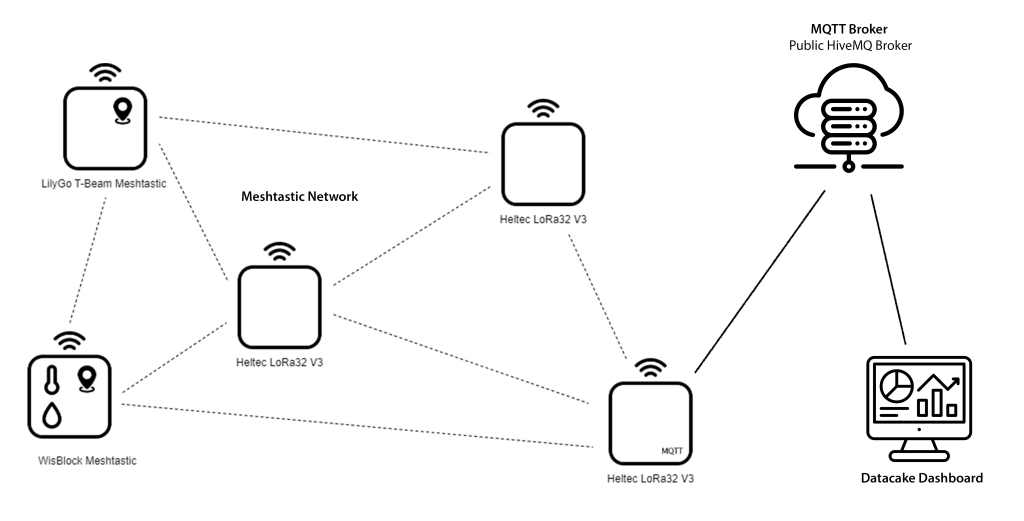
For initial tests, I set up the Meshtastic network shown in the picture.

Für erste Tests habe ich das im Bild gezeigte Meshtastic Netzwerk aufgebaut.

Meshtastic Network

I’m going to show you the first results here, to whet your appetite for a more in-depth exploration of the world of Meshtastic.

The first image shows the router created with a Heltec Lora32 V3 connected to the mobile phone via WiFi (192.168.1.114). The second shows my own nodes and the third shows external nodes visible on the public primary channel. Depending on the configuration of each node, you can see battery voltage, GPS data, environmental data, and distances. The fourth screen shows the location data on a map of the area. Beam shows the location of my LilyGo T-Beam.

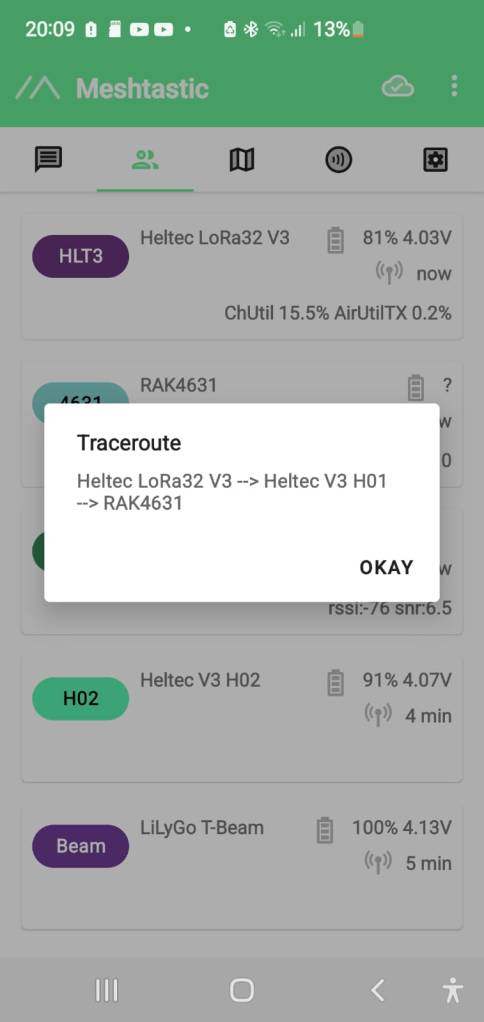
The last two screens show the tracking of a moving node. First, the connection is made via the LilyGo T-Beam, and then, after the position has changed, via the Heltec V3 H01 node. This rerouting shows very well the possibilities of a mesh network.

Ich zeige Ihnen hier erste Ergebnisse, um die Lust am tieferen Erkunden der Meshtastic Welt zu wecken.

Im ersten Bild ist der mit einem Heltec Lora32 V3 gebildete Router über WiFi (192.168.1.114) mit dem Mobilphone verbunden, während im zweiten meine eigenen Knoten und im dritten Bild externe, im öffentlichen Primary Channel sichtbare Knoten zu sehen sind. Je nach Ausstattung der jeweiligen Knoten werden Batteriespannung, GPS-Daten oder Umgebungsdaten und Entfernungen angezeigt. Im vierten Bild sind die Positionsdaten in einem Map angezeigt. Mit Beam sehen Sie die Standortdaten meines LilyGo T-Beam.

Die beiden letzten Bilder zeigen das Tracing eines bewegten Knotens. Zuerst erfolgt die Verbindung über den LilyGo T-Beam und nach der Veränderung der Position über den Knoten Heltec V3 H01. Dieses Re-Routing zeigt die Möglichkeiten eines Mesh Netzwerk sehr gut.

The router supports the organization of network participants and the sending of MQTT messages via its WiFi interface. By connecting to the Internet, it can bridge the boundaries of the mesh network.

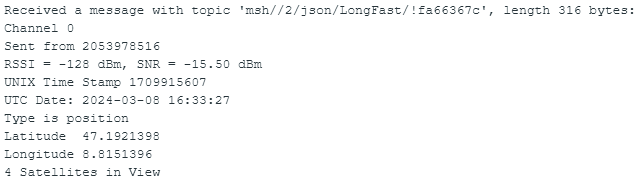
For example, an MQTT message in JSON format contains the information shown in the following image

Der Router unterstützt nicht nur die Organisation der Teilnehmer des Netzwerks, sondern ermöglicht durch sein WiFi-Interface auch das Versenden von MQTT-Messages und kann dadurch die Grenzen des Mesh-Netzwerks durch Verbindung ins Internet überbrücken.

Eine MQTT-Message im JSON-Format enthält beispielsweise die im folgenden Bild gezeigten Informationen.

The information can be made readable by parsing the transmitted payload.

I use a separate ESP32 for this, which has subscribed to the messages with the topic msh/#, decodes their payload and displays it via the console. The display can of course also be made more convenient.

Durch Parsing der übermittelten Payload kann die Information lesbar gestaltet werden.

Ich nutze hierfür einen separaten ESP32, der die Messages mit dem Topic msh/# abonniert hat, deren Payload decodiert und über die Console zur Anzeige bringt. Die Anzeige kann natürlich auch komfortabler gestaltet werden.

Telemetry Message
Position Message

The Meshtastic logo trademark is the trademark of Meshtastic LLC.


2024-03-08/CK

RAKwireless WisBlock

WisBlock is a modular system that easily implements a Low Power Wide Area Network (LPWAN) in your IoT solution. WisBlock accompanies your solution from rapid prototyping to mass production without the need to create new hardware modules for each step.

In the development phase, WisBlock modularity allows you to test different microcontrollers, sensors, communication technology, and IO options by changing modules with simple plug-in modules.
WisBlock industrial-grade modules can be used in mass production without the need to redesign prototypes.
Devices can be modified or repaired even once deployed with minimal waste and effort.

Where to buy international:

store.rakwireless.com

WisBlock ist ein modulares System, das auf einfache Weise ein Low Power Wide Area Network (LPWAN) in Ihre IoT-Lösung implementiert. WisBlock begleitet Ihre Lösung vom Rapid Prototyping bis zur Massenproduktion, ohne dass Sie für jeden Schritt neue Hardwaremodule erstellen müssen.

In der Entwicklungsphase können Sie dank der Modularität von WisBlock verschiedene Mikrocontroller, Sensoren, Kommunikationstechnologien und IO-Optionen testen, indem Sie Module gegen steckbare Module austauschen.
WisBlock-Module in Industriequalität können in der Massenproduktion eingesetzt werden, ohne dass Prototypen neu entwickelt werden müssen.
Die Geräte können auch nach dem Einsatz mit minimalem Aufwand modifiziert oder repariert werden.

Bezugsmöglichkeiten DACH:
D: https://iot-shop.de/
CH: https://www.bastelgarage.ch/


Futher Information: IoT Projects for Makers – 2nd Edition


2024-01-17/CK

SensorHub – Reduction of Power Consumption

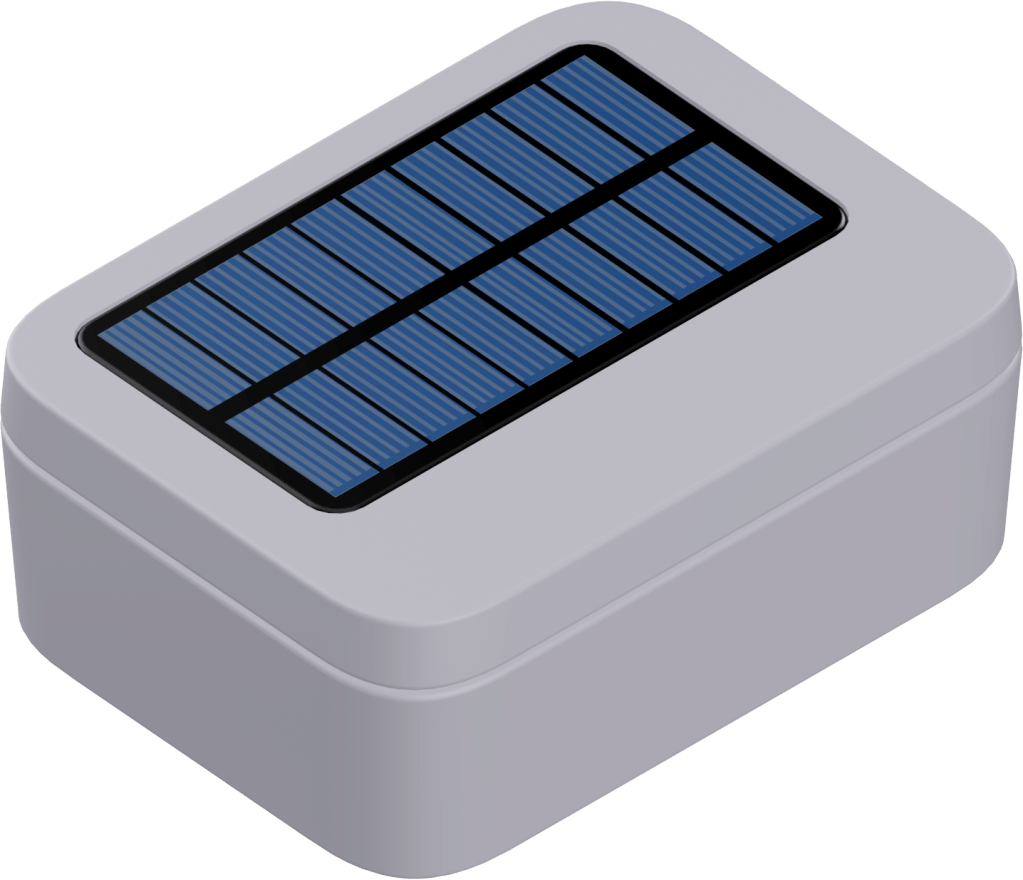
The power supply of the SensorHub by an RAK9154 solar battery enables the autonomous operation of the complete measuring station. I describe this in my eBook SensorHub IoT Applications.

I had to close the chapter describing this application as follows: On sunny days, recharging the battery will hardly be a problem. On cloudy days, this balance looks less favorable, and it remains to be seen whether the weather conditions in my area offer sufficiently good conditions. It is, therefore, essential that the anticipated variant of the SensorHub promises to reduce power requirements further.

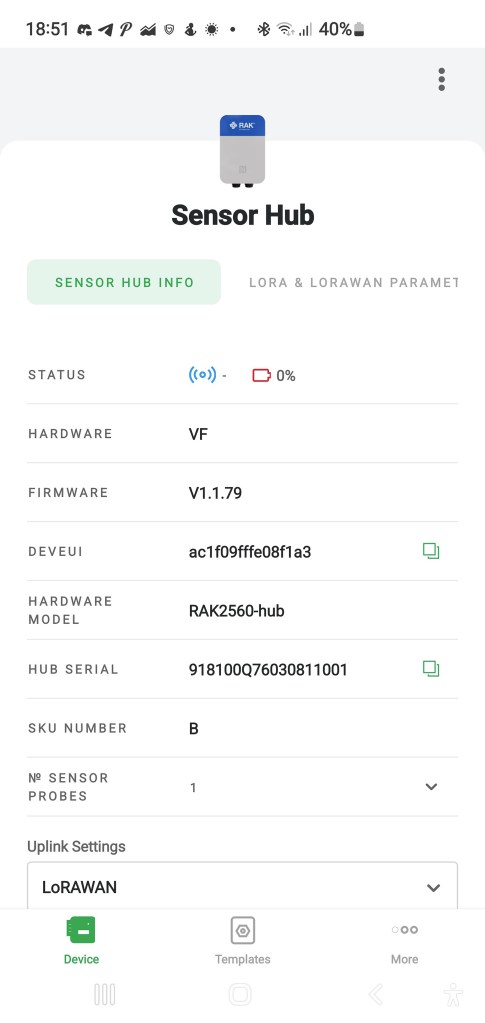
I have good news today. I got a new version of SensorHub and replaced the existing one. As you can see in the screenshot of the WisToolBox app, the hardware version changed from VF zu VH and the firmware from V1.1.79 to V1.2.6.

Existing Version of SensorHub
New Version of SensorHub

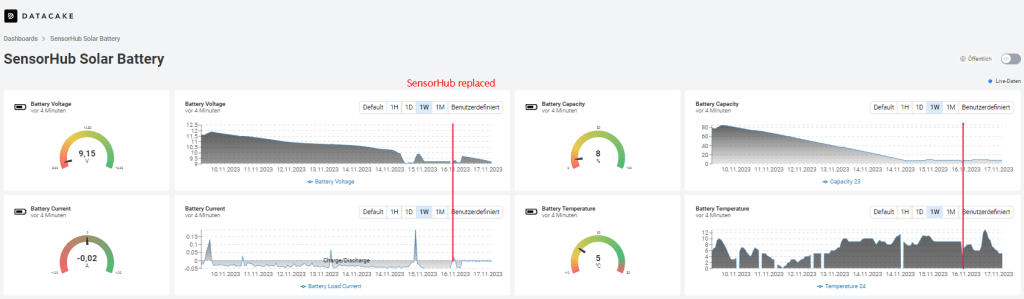
The following screenshot shows the behavior of the solar battery before and after the SensorHub replacement. The weather conditions are worse over the whole period.

You can see that before the replacement of the SensorHub the current consumption was about 50 mA in the phase of discharge. After the replacement, it is reduced significantly. The same behavior can be seen in the battery capacity curve. Before the replacement, the battery capacity dropped between 10% and 20% per day without recharging.

After the replacement, the discharge remains quite small. The current consumption was about 10 mA in the phase of discharge, and the battery capacity dropped by about 1%. The weather conditions were very bad therefore, the recharging was limited to a short time.

Now, I’m waiting for a sunny day so that the solar cell can charge the battery sufficiently to survive a period of bad weather without losing the connection.

The sun came out for a few hours, and the battery was charged. During this time, the solar cell delivers a considerable charging current.

We are on the right way, as you can see, after two days with a bit of sun.


2023-11-23/CK

SensorHub IoT Applications

RAKwireless‘ SensorHub is a modular ecosystem consisting of the main body and multiple pre-configured sensor probes. With pluggable, interchangeable probes and the option to add third-party sensors to the system, the Sensor Hub is a suitable and versatile solution platform for various IoT applications where environmental monitoring is needed outdoors.

The SensorHub can work battery-powered by non-rechargeable or solar-powered batteries or with an external power supply, depending on the application and deployment location.

For data transmission into Low-Power Wide-Area Network (LPWAN), LoRaWAN is available. Alternatively, NB-IoT can be used.

As a typical low-code system, it requires configuration with the WisToolBox app from a cell phone. WisToolBox also enables access to the measured values of all connected sensors, as the following screenshots show.

The eBook SensorHub IoT Applications will be available from Amazon from November 15, 2023. Pre-orders are already possible.

This eBook introduces the SensorHub system and its usage in industrial-grade IoT applications using LoRaWAN for communication.

The first image shows a SensorHub with a connected SensorProbe equipped with WisBlock sensors. This application is suitable for powering by batteries, too.

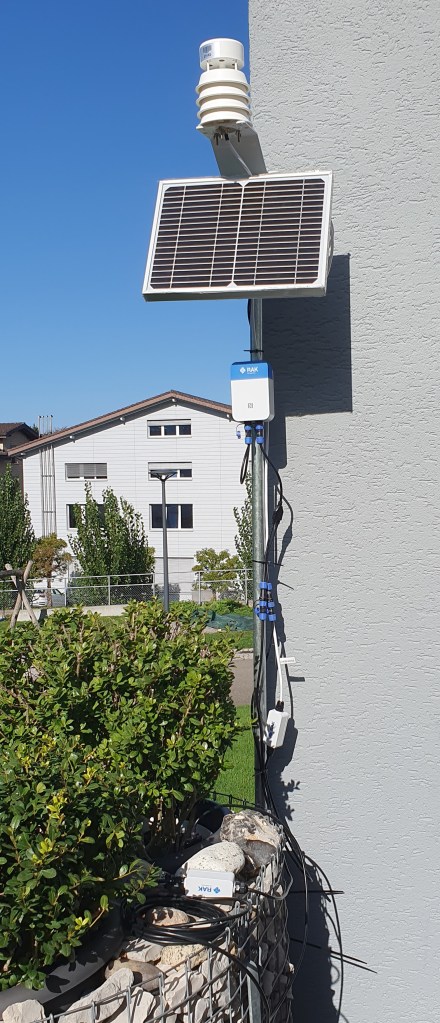
The second image shows a SensorHub Measuring Station built by RK900-09 Weather Station, RK520-02 Soil Moisture Sensor, and RAK9154 Solar Battery. These components build an autonomous working measuring station. The measuring station was installed to test the acquisition of the measuring values via the connected sensors on the one hand and its behavior regarding solar-buffered battery operation in the darker season on the other hand.

You can access the live data at https://app.datacake.de/dashboard/d/8f0da5ea-e1f5-4da8-b951-7c19c98e0de2 and the loading situation of the solar-buffered battery at https://app.datacake.de/dashboard/d/19f2e113-74b9-4950-81be-28f9df871ae0.

This new eBook shows how to create professional IoT applications with the RAKwireless SensorHub system.

I will publish additions and further applications here in this blog.

Your queries are welcome.


2023-11-08/CK

SensorHub Measuring Station for Weather and Soil Parameters

The RK900-09 Weather Station described in my post RK900-09 Weather Station on SensorHub is the base for this SensorHub Measuring Station built by RK900-09 Weather Station, RK520-02 Soil Moisture Sensor, and RAK9154 Solar Battery. These components manufactured by RAKwireless build an autonomous working measuring station.

The measuring station was installed to test the acquisition of the measuring values via the connected sensors on the one hand and its behavior regarding battery operation in the darker season on the other hand.

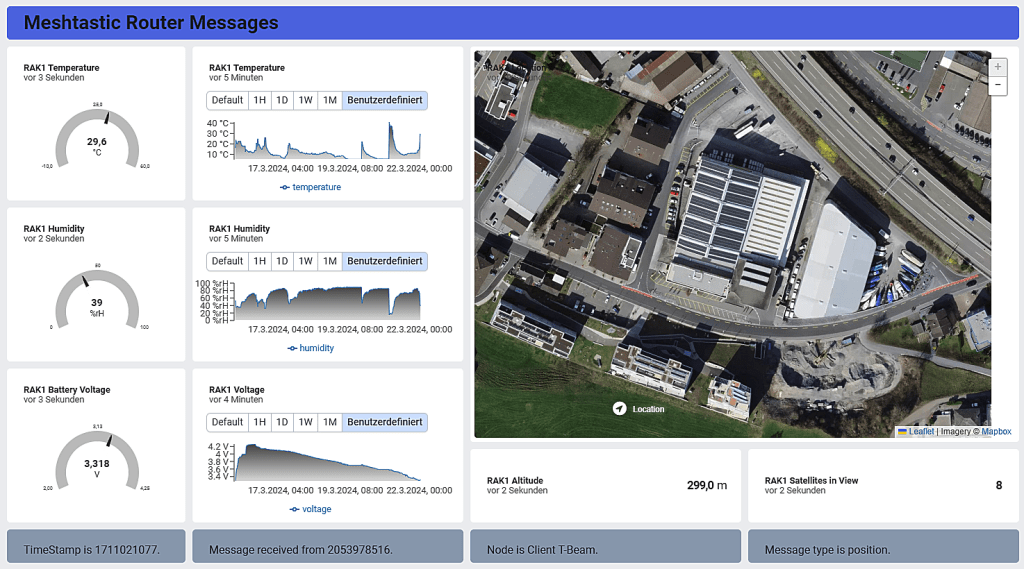
The SensorHub periodically sends the measuring values to the TTN (CE) LNS. Datacake serves as a visualization platform, as the following screenshots show.

Datacake Dashboard

You can follow the acquired data on the Datacake dashboard via this Public Link.

Details of the implementation and required adaptions to the payload decoder for both platforms, as well as further hints to SensorHub, will be published in the eBook mentioned in the post RAKwireless IoT Applications.


2023-10-26/CK

Proyectos IoT para Makers

La edición española ya está disponible en Amazon.es


2023-10-26/CK

RAKwireless IoT Applications

IoT applications usually require interdisciplinary collaboration between different disciplines during development and implementation.

With WisBlock, RAKwireless created a system accompanying the entire development path to the finished device using industrial-grade yet cost-effective components. Additionally, it offers the possibility to integrate components of prototyping systems from third-party providers into WisBlock.

With these systems, you can solve various tasks. Still, many steps are necessary to get a finished device, e.g., autonomy usable as a sensor node in harsh environments, which can be tedious.

True to the philosophy „IoT Made Easy,“ RAKwireless has ensured with WisBlock that this new solution is as simple as Click – Code – Connect!

I described the WisBlock ecosystem in an eBook titled „IoT-Projects for Makers: with WisBlock from RAKwireless • just Click, Code & Connect • to the finished device.“  

You can order this eBook at Amazon https://www.amazon.com/dp/B0C8VCF4DF.

Continuing this design philosophy, based on WisBlock, RAKwireless developed the RAK2560 WisNode SensorHub.

RAKwireless SensorHub is a modular ecosystem consisting of the main body and multiple pre-configured sensor probes. With pluggable, interchangeable probes and the option to add third-party sensors to the system, the Sensor Hub is a suitable and versatile solution platform for various IoT applications where environmental monitoring is needed outdoors.

The SensorHub can work battery-powered by non-rechargeable or solar-powered batteries or with an external power supply, depending on the application and deployment location.

For data transmission into Low-Power Wide-Area Network (LPWAN), LoRaWAN is available. Alternatively, NB-IoT can be used.

As a typical low-code system, it essentially requires configuration with the WisToolBox app from a cell phone.

I am currently working on applications of SensorHub in IoT using the example of measuring environmental data.

An eBook titled
„SensorHub IoT Applications:
• with WisNode SensorHub from RAKwireless
• just configure & connect
• to the finished application.“
is in preparation.

The planned release date is 11/15/2023, and pre-orders are available on Amazon.

You can order this eBook at Amazon https://www.amazon.com/dp/B0CKFNQX4D.


2023-10-05/CK

RK900-09 Weather Station on SensorHub

The Sensor Hub equipped with a Sensor Probe containing Temperature and Humidity Sensor RAK1901 and Pressure Sensor RAK1902 was used to measure environmental data (Link).

RAKwireless offers the RK900-09 Weather Station more precise equipment for measuring weather conditions.

MEMS sensors measure temperature, humidity, barometric pressure, and ultrasonic sensors wind speed and direction. You will find the technical data on the manufacturer’s website.

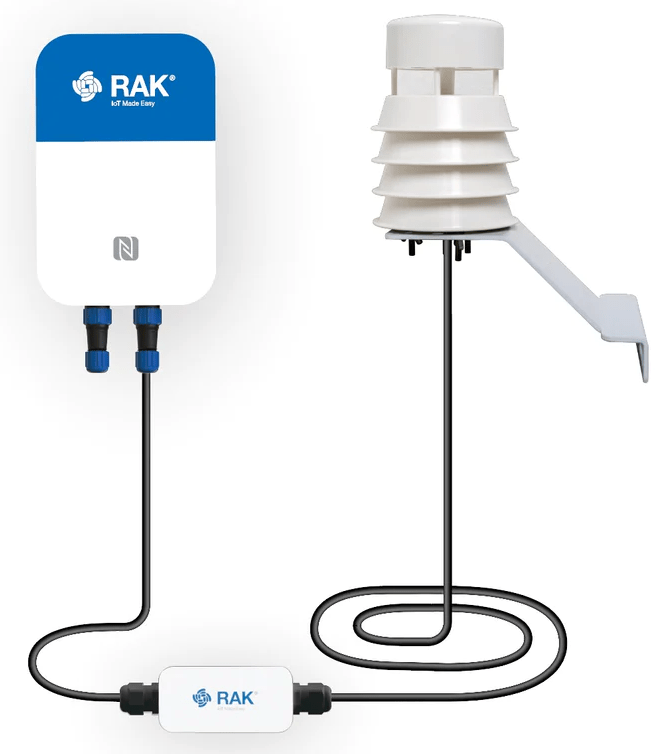
The SensorProbeIO associated with the RK900-09 connects the RS-485 output of the RK900-09 to the SensorHub interface.

The payload decoder provided by RAKwireless needed minor adaptations and is available on GitHub.

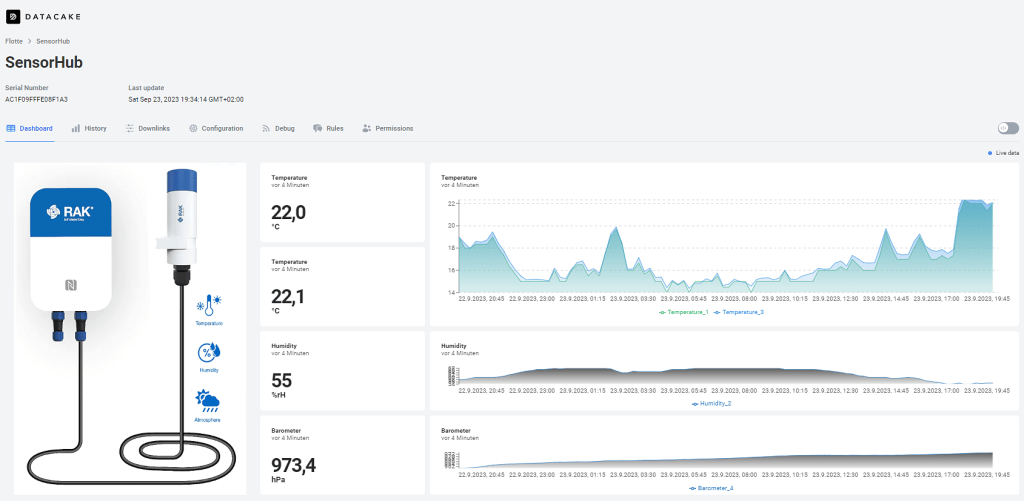
For visualization, I use Datacake again and get the following data output of this Weather Station.

Datacake Dashboard

Use this QR code or public link to get the actual weather data measured by RK900-09 Weather Station connected to SensorHub.


2023-09-26/CK

The first Sensor Hub application is running…

The Sensor Hub equipped with a Sensor Probe containing Temperature and Humidity Sensor RAK1901 and Pressure Sensor RAK1902 measures environmental data and sends them to TTS (CE). Datacake provides for the Visualization.

RAKwireless Sensor Hub is an excellent example of how low-code platforms help implement IoT solutions extremely fast.


2023-09-23/CK

ESP32Forth – eine alternative Programmierumgebung

Für den ESP32 steht mit MicroPython eine interaktive Programmiersprache zur Verfügung. Das ist aber nicht die einzige Möglichkeit der interaktiven Programmierung, denn mit ESP32Forth steht auch eine Portierung von eForth (Arduino and eForth) für den ESP32 zur Verfügung.

Wenn Ihnen Forth unbekannt sein sollte, dann erlätert ChatGPT Ihnen FORTH wie folgt:

Die Programmiersprache FORTH ist eine ungewöhnliche und spezielle Programmiersprache, die sich von C++ und MicroPython in vielerlei Hinsicht unterscheidet, insbesondere beim Einsatz auf Mikrocontrollern. Hier sind einige der wichtigsten Eigenschaften und Unterschiede:

Eigenschaften von FORTH:

  1. Stack-basierte Sprache: FORTH verwendet einen Stapelspeicher (Stack) als zentrales Konzept. Operationen und Daten werden auf den Stapel verschoben und von dort verarbeitet. Dies macht FORTH sehr leichtgewichtig und effizient.
  2. Interaktivität: FORTH ist eine interaktive Programmiersprache. Sie können Code direkt in die FORTH-Umgebung eingeben und ausführen, was sie ideal für den schnellen Prototypenbau und das Debugging macht.
  3. Minimalistische Syntax: Die Syntax von FORTH ist extrem einfach, bestehend aus Wörtern (FORTH-Befehlen), die von Leerzeichen getrennt sind. Dies führt zu sehr kompaktem Code.
  4. Keine strikte Typisierung: FORTH ist schwach typisiert und flexibel. Dies kann sowohl ein Vor- als auch ein Nachteil sein, je nach Anwendungsfall.
  5. Direkter Hardwarezugriff: FORTH ermöglicht einen sehr direkten Zugriff auf die Hardware, was in eingebetteten Systemen nützlich sein kann.

Unterschiede zu C++:

  1. Sprachparadigma: C++ ist eine objektorientierte Programmiersprache, während FORTH als stapelbasierte Programmiersprache betrachtet wird. Dies bedeutet, dass die Herangehensweise an die Programmierung grundlegend unterschiedlich ist.
  2. Komplexität: C++ ist eine umfangreiche und komplexe Sprache mit einer Vielzahl von Funktionen und Bibliotheken. FORTH hingegen ist extrem minimalistisch und erfordert oft mehr Zeilen Code, um ähnliche Aufgaben zu erledigen.
  3. Typisierung: C++ ist stark typisiert, was bedeutet, dass Datentypen streng überprüft werden. FORTH ist schwach typisiert und erlaubt mehr Flexibilität bei der Verwendung von Daten.

Unterschiede zu MicroPython:

  1. Syntax: MicroPython ist eine Python-Variante für Mikrocontroller und verwendet eine Python-ähnliche Syntax, während FORTH seine eigene einzigartige Syntax hat.
  2. Abstraktionsebene: MicroPython bietet eine höhere Abstraktionsebene und mehr Konventionalität im Vergleich zu FORTH. Das macht MicroPython oft einfacher zu erlernen und zu verwenden.
  3. Gemeinschaft und Bibliotheken: MicroPython hat eine aktive Gemeinschaft und eine breite Palette von Bibliotheken und Modulen, die speziell für Mikrocontroller entwickelt wurden. FORTH hat weniger Ressourcen und Unterstützung in dieser Hinsicht.
  4. Entwicklungsumgebungen: MicroPython wird oft mit modernen integrierten Entwicklungsumgebungen (IDEs) verwendet, die die Entwicklung und das Debugging erleichtern. FORTH erfordert häufig eine tiefere Einarbeitung in die Arbeitsweise des Stapels und der FORTH-Umgebung.

Insgesamt hängt die Wahl zwischen FORTH, C++ und MicroPython für Mikrocontroller-Anwendungen von den spezifischen Anforderungen Ihres Projekts, Ihrer Programmierpräferenz und Ihrer Erfahrung ab. FORTH ist eine leistungsfähige, aber unkonventionelle Option, die für bestimmte Anwendungen geeignet sein kann, während C++ und MicroPython aufgrund ihrer weitverbreiteten Akzeptanz und ihrer Entwicklungsunterstützung oft bevorzugt werden.

OpenAI. (2023). ChatGPT (August 3 Version) [Large language model]. https://chat.openai.com

Wenn Sie sich mit ESP32Forth auseinandersetzen wollen, dann finden Sie die notwendigen Informationen von Installation bis hin zur Anwendung unter https://esp32.forth2020.org/ oder https://www.facebook.com/groups/esp32forth/

Ich möchte Ihnen hier zwei Beispiele zur Arbeit mit ESP32Forth zeigen, die vielleicht helfen Neugier zu wecken.

Benchmarks sind eine beliebte Vergleichsmöglichkeit für Hard- und Software. Um einen Eindruck von der Performance von ESP32Forth auf einem ESP32 zu bekommen, habe ich den DDBench(mark) herangezogen (https://theultimatebenchmark.org/).

Das Resultat des Benchmarks sind eine Laufzeit von 5.5 Sekunden.

Vergleichen Sie das Resultat mit den unter https://theultimatebenchmark.org/ veröffentlichten Daten, dann können Sie sich ein Bild von der Leistungsfähigkeit dieser Hard- und Softwarekombination machen.

Im Blogpost ESP32 ADC & DAC hatte ich die Performance des DAC-ADC-Subsystems des ESP32 untersucht.

Wenige Zeilen ESP32Forth Code ermöglichen die Ansteuerung eines DACs und das Erfassen dessen Ausgangsspannung durch einen Kanal des ADC. GPIO25 und GPIO33 werden hierzu miteinander verbunden.

( Test ESP32-DAC-ADC-Subsystem w/ ESP32Forth )

25 CONSTANT DAC1 \ GPIO25
33 CONSTANT ADC1_CH5 \ GPIO33

: wait100ms 100 ms ;
: readADC1_CH5 ADC1_CH5 adc . ;
: readADC readADC1_CH5 ;
: writeDAC1 DAC1 swap dacWrite ; ( 0-255 -- )
: test dup writeDAC1 wait100ms readADC . cr ; ( 0-255 -- )
: testloop 255 for i test next ;

Die seriellen Ausgaben habe ich geloggt, um diese für die folgenden Grafiken aufzubereiten.

Das Verhalten des analogen Subsystems entspricht den Erwartungen und ist ohne Anpassungen nur bedingt einsatzfähig.

Der einfache Test mit dieser interaktiven Programmierumgebungen wird aber deutlich.


2023-09-14/CK